
RAP File Upload-Large Objects (LOBs)-Dosya Yükleme
LOB, büyük boyuttaki yapılar için kullanılan bir kavramdır. Görsel, PDF, Excel, txt ya da Word dosyaları birer LOB’dur.
LOB lar
. Attachment,
· Mime type,
· Filename
Aracılığıyla modellenir.
Attachment alanı, LOB’un kendisini RAWSTRING formatında içerir. ATTACHMENT, genellikle LOB (Large Object) tipindeki veriyi temsil eder. Bu, veritabanında saklanan büyük boyutlu dosyanın kendisidir. Bu dosya herhangi bir formatta olabilir (PDF, resim, video, ses dosyası, belge vb.).
MIMETYPE, ATTACHMENT’ın (ek dosyanın) türünü belirtir. Bu, alıcı uygulamanın (örneğin, bir web tarayıcısı veya bir e-posta istemcisi) dosyayı nasıl işleyeceğini (örneğin, hangi uygulamayla açacağını veya nasıl görüntüleyeceğini) belirlemesine yardımcı olur.
Özellikleri:
- Metin tabanlı bir etikettir (örneğin, “application/pdf”, “image/jpeg”, “video/mp4”).
- Dosyanın içeriği hakkında bilgi verir.
- Web sunucuları ve tarayıcılar arasında dosya türlerini belirtmek için yaygın olarak kullanılır.
- Örnek: Bir resim dosyasının MIMETYPE değeri “image/jpeg” veya “image/png” olabilir. Bir PDF belgesinin MIMETYPE değeri ise “application/pdf” olur.
FILENAME (Dosya Adı):
- İşlevi: FILENAME, ATTACHMENT’ın (ek dosyanın) orijinal adını belirtir. Bu, kullanıcının dosyayı kaydederken veya açarken göreceği addır.
- Özellikleri:
- Dosyanın adını ve uzantısını içerir (örneğin, “rapor.pdf”, “resim.jpg”).
- Dosyanın içeriği hakkında doğrudan bilgi vermez, ancak kullanıcının dosyayı tanımasına yardımcı olur.
- Dosya sisteminde saklanırken veya indirilirken kullanılır.
ADIMLAR: Bu projede OData V4 Service kullanılmıştır.
- Z’li tablonuza tipi rawstring olan bir attachment alanı, tipi char(128) olan bir filename alanı ve tipi yine char(128) olan bir mimetype alanı ekleyiniz.

ZMATERIAL TABLO
@EndUserText.label : 'Material Table'
@AbapCatalog.enhancement.category : #NOT_EXTENSIBLE
@AbapCatalog.tableCategory : #TRANSPARENT
@AbapCatalog.deliveryClass : #A
@AbapCatalog.dataMaintenance : #RESTRICTED
define table zmaterial {

  key client         : abap.clnt not null;
  key materialid     : abap.char(10) not null;
  description        : abap.string(0);
  origin             : abap.char(50);
  status             : abap.char(1);
  createdby          : abp_creation_user;
  username           : usalias;
  attachement        : abap.rawstring(214748);
  filename           : abap.char(128);
  mimetype           : abap.char(128);
  createdat          : abp_creation_tstmpl;
  lastchangedby      : abp_lastchange_user;
  lastchangedat      : abp_lastchange_tstmpl;
  locallastchangedat : abp_locinst_lastchange_tstmpl;
}
2. Varsa Draft tablonuza da ekleyiniz.
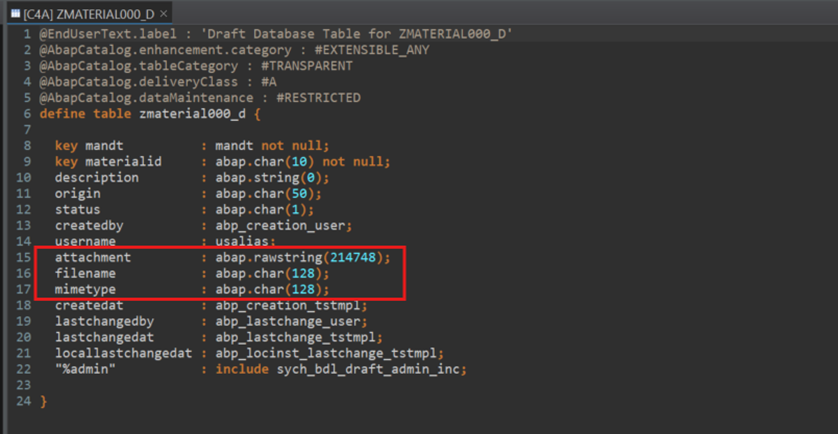
ZMATERIAL000_D – Draft Table
@EndUserText.label : 'Draft Database Table for ZMATERIAL000_D'
@AbapCatalog.enhancement.category : #EXTENSIBLE_ANY
@AbapCatalog.tableCategory : #TRANSPARENT
@AbapCatalog.deliveryClass : #A
@AbapCatalog.dataMaintenance : #RESTRICTED
define table zmaterial000_d {

  key mandt          : mandt not null;
  key materialid     : abap.char(10) not null;
  description        : abap.string(0);
  origin             : abap.char(50);
  status             : abap.char(1);
  createdby          : abp_creation_user;
  username           : usalias;
  attachment         : abap.rawstring(214748);
  filename           : abap.char(128);
  mimetype           : abap.char(128);
  createdat          : abp_creation_tstmpl;
  lastchangedby      : abp_lastchange_user;
  lastchangedat      : abp_lastchange_tstmpl;
  locallastchangedat : abp_locinst_lastchange_tstmpl;
  "%admin"           : include sych_bdl_draft_admin_inc;

}
3. Interface View
@Semantics.largeObject : { mimeType: 'Mimetype',  fileName: 'Filename',  contentDispositionPreference: #INLINE }
attachement as Attachement,
filename as Filename,
@Semantics.mimeType: true
mimetype as Mimetype,

@AccessControl.authorizationCheck: #NOT_REQUIRED
@Metadata.allowExtensions: true
@EndUserText.label: '###GENERATED Core Data Service Entity'
define root view entity ZR_MATERIAL000
  as select from zmaterial as Material
  association [0..1] to I_IAMBusinessUserLogonDetails as _CreatedByUser on _CreatedByUser.UserID = Material.createdby

{
  key materialid              as Materialid,
      description             as Description,
      @Semantics.mimeType: true
      origin                  as Origin,
      //      stock                   as Stock,
      @UI.lineItem: [{ position: 35, label: 'Status', type: #AS_DATAPOINT }]
      //      @UI.dataPoint: { visualization: #PROGRESS, targetValue: 'Stock', criticality: 'Critical' }
      //      case when stock >= 200 then 2  //orange
      //      when stock >= 500 then 1
      //      else 0 end              as Critical,
      status                  as Status,
      @Semantics.user.createdBy: true
      @ObjectModel.text.element: [ 'Username' ]
      @UI.textArrangement: #TEXT_LAST
      Material.createdby      as Createdby,
      _CreatedByUser.UserName as Username,
      @Semantics.largeObject : {mimeType: 'Mimetype', fileName: 'Filename', contentDispositionPreference: #INLINE }
      attachement             as Attachment,
      filename                as Filename,
      @Semantics.mimeType: true
      mimetype                as Mimetype,
      @Semantics.systemDateTime.createdAt: true
      createdat               as Createdat,
      @Semantics.user.lastChangedBy: true
      lastchangedby           as Lastchangedby,
      @Semantics.systemDateTime.lastChangedAt: true
      lastchangedat           as Lastchangedat,
      @Semantics.systemDateTime.localInstanceLastChangedAt: true
      locallastchangedat      as Locallastchangedat

}
4. Varsa bu alanları Projection View/Consumption View’inize ekleyiniz.

@Metadata.allowExtensions: true
@EndUserText.label: '###GENERATED Core Data Service Entity'
@AccessControl.authorizationCheck: #CHECK
define root view entity ZC_MATERIAL000
  provider contract transactional_query
  as projection on ZR_MATERIAL000
{
  key Materialid,
      Description,
      Origin,
      //      MaxStock,
      //      Stock,
      Status,
      Createdby,
      Username,
      Attachment,
      Filename,
      Mimetype,
      Createdat,
      Lastchangedby,
      Lastchangedat,
      Locallastchangedat

}
5. Metadata Extension: Fiori ekranında bu alanların gelebilmesi için aşağıdaki annotasyonları kullanabilirsiniz.

@Metadata.layer: #CORE
@UI.headerInfo.title.type: #STANDARD
@UI.headerInfo.title.value: 'Materialid'
@UI.headerInfo.description.type: #STANDARD
@UI.headerInfo.description.value: 'Materialid'

@Search.searchable: true
//@UI.badge.imageUrl: 'sap-icon://employee-lookup'
@UI.badge.headLine.iconUrl: 'sap-icon://employee-lookup'


annotate view ZC_MATERIAL000 with
{
//  @UI: { lineItem: [ { position: 10 },{ type: #FOR_ACTION,
//                       dataAction: 'copyTravel',
//                       label: 'Copy Travel'
//                         }, {iconUrl: 'sap-icon://employee-lookup'  }]}


  @EndUserText.label: 'Materialid'
  @UI.facet: [ {
    label: 'General Information',
    id: 'GeneralInfo',
    purpose: #STANDARD,
    position: 10 ,
    type: #IDENTIFICATION_REFERENCE
  } ]
  @UI.identification: [ {
    position: 10
  } ]
    @UI.lineItem: [ {
      position: 10
    } ]
  //  @UI.selectionField: [ {
  //    position: 10
  //  } ]
  @Search.defaultSearchElement: true
  @Search.fuzzinessThreshold: 0.8
  Materialid;

  @EndUserText.label: 'Description'
  @UI.identification: [ {
    position: 20
  } ]
  @UI.lineItem: [ {
    position: 20
  } ]
  //  @UI.selectionField: [ {
  //    position: 20
  //  } ]
  @UI.multiLineText: true
  Description;

  @EndUserText.label: 'Origin'
  @UI.identification: [ {
    position: 30
  } ]
  @UI.lineItem: [ {
    position: 30
  } ]
  @UI.selectionField: [ {
  position: 30
  } ]
  Origin;

  @EndUserText.label: 'Status'
  @UI.identification: [ {
    position: 36
  } ]
  @UI.lineItem: [ {
    position: 36,
  label: 'Status'
      } ]
  Status;


  @UI.identification: [ {
    position: 40 ,
    label: 'Created By'
  } ]
  @UI.lineItem: [ {
    position: 40 ,
    label: 'Created By'
  } ]
  //  @UI.selectionField: [ {
  //    position: 40
  //  } ]
  Createdby;

  //  @UI.identification: [{
  //   position: 45,
  //   label: 'Username' }]
  //  @UI.lineItem: [{
  //  position: 45,
  //  label: 'Username' }]
  //  Username;


  @UI: { lineItem: [{position: 50 , label: 'Attachment'  }],
  identification: [{ position: 50 , label: 'Attachment' }]}
  Attachment;

  @UI: { lineItem: [{position: 60 , label: 'Filename'  }],
  identification: [{ position: 60 , label: 'Filename' }]}
  Filename;

  @UI: { lineItem: [{position: 70 , label: 'Mimetype'  }],
  identification: [{ position: 70 , label: 'Mimetype' }]}
  @UI.selectionField: [ { position: 50 } ]
  Mimetype;


  @UI.identification: [ { position: 80 , label: 'Created On' } ]
  @UI.lineItem: [ { position: 80 , label: 'Created On' } ]
  Createdat;

  @UI.identification: [ { position: 90 , label: 'Changed By' } ]
  @UI.lineItem: [ { position: 90 , label: 'Changed By' } ]
  Lastchangedby;

  @UI.identification: [ { position: 100 , label: 'Lastchangedat' } ]
  @UI.lineItem: [ { position: 100 , label: 'Lastchangedat' } ]
  Lastchangedat;

  @UI.identification: [ { position: 110 , label: ' Locallastchangedat' } ]
  @UI.lineItem: [ { position: 110 , label: ' Locallastchangedat' } ]
  Locallastchangedat;
}
6)Behavior Definition

managed implementation in class ZBP_R_MATERIAL000 unique;
strict ( 2 );
with draft;
define behavior for ZR_MATERIAL000 alias ZrMaterial000
persistent table zmaterial
draft table zmaterial000_d
etag master Locallastchangedat
lock master total etag Lastchangedat
authorization master ( global )

{
  field ( mandatory : create )
  Materialid;

  field ( readonly )
  Createdby,
  Createdat,
  Lastchangedby,
  Lastchangedat,
  Locallastchangedat,
  Username,
  //  Stock,
  Status;

  field ( readonly : update )
  Materialid;


  create;
  update;
  delete;

  draft action Activate optimized;
  draft action Discard;
  draft action Edit;
  draft action Resume;
  draft determine action Prepare;

  mapping for zmaterial
    {
      Materialid         = materialid;
      Description        = description;
      Origin             = origin;
      //      Stock              = stock;
      Status             = status;
      Createdby          = createdby;
      Username           = username;
      Attachment         = attachement;
      Filename           = filename;
      Mimetype           = mimetype;
      Createdat          = createdat;
      Lastchangedby      = lastchangedby;
      Lastchangedat      = lastchangedat;
      Locallastchangedat = locallastchangedat;
    }
}
Projection Behavior Definition

projection implementation in class ZBP_C_MATERIAL000 unique;
strict ( 2 );
use draft;
define behavior for ZC_MATERIAL000 alias ZcMaterial000
use etag

{
  use create;
  use update;
  use delete;

  use action Edit;
  use action Activate;
  use action Discard;
  use action Resume;
  use action Prepare;
}
Fiori Launcpadde Yarattığımız Programı İnceleyelim;
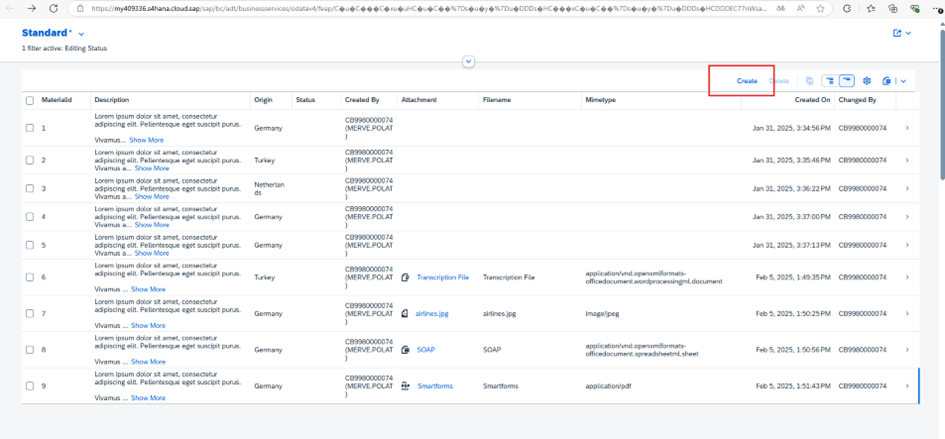
Create butonuna tıklanıp bir kayıt oluştrulur.
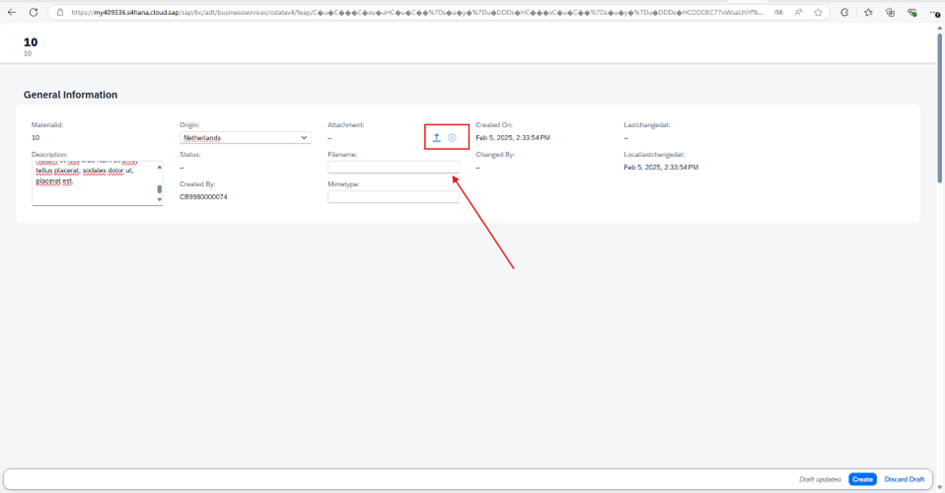
Attachemnt kısmında ok ikonuna basılınca yüklemek istediğiniz dosya yolu seçtirliecektir.
Çarpı ikonu ise seçilen dosyanın bırakılmasını sağlar.
Dosya seçilir.

Dosya ismi girilir ve create butonuna basılır.

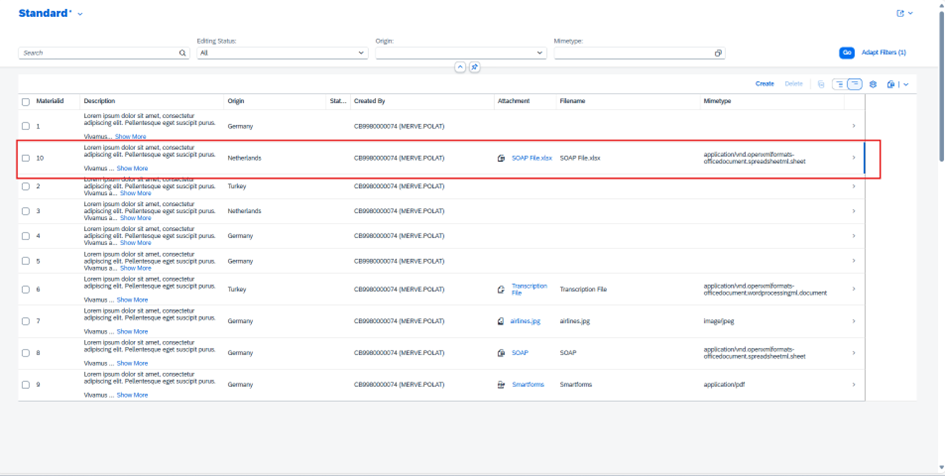
Excel dosyası olduğunu belirten ikon otomatik olarak gelmektedir. PDF, Word ve görseller için farklı ikonlar default olarak gelir. Aynı zamanda Mimetype kısmı da yüklenen dosya türüne göre otomatik doldurulur.
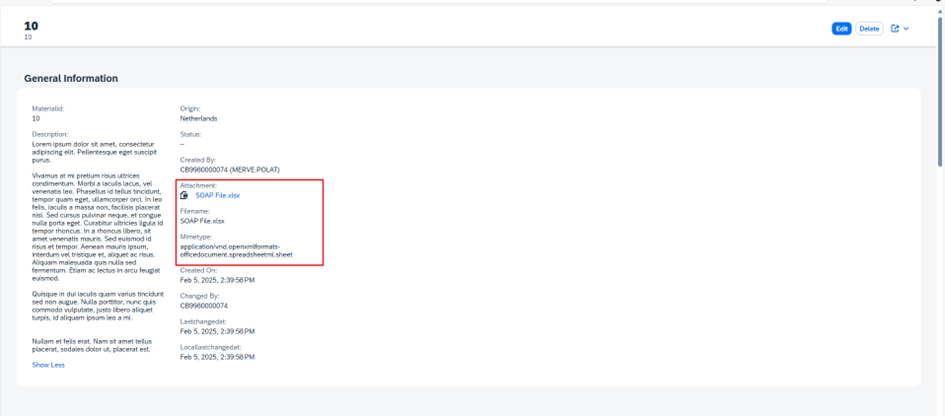
SONUÇ
NOT: Eğer sadece belirli tiplerdeki dosyalara izin vermek istiyorsanız aşağıdaki kod parçasını ekleyiniz.

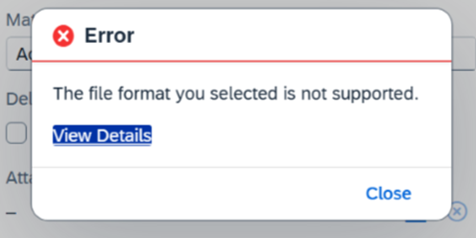
İstenilen tipte bir dosya girmezsek aşağıdaki gibi bir hata mesajı alırız.
Bir sonraki yazımızda görüşmek dileğiyle 😇