
DOCKING CONTAINER
ALV basmanın birçok yolu vardır. ALV, custom bir container üzerine basılabileceği gibi, full screen üzerine basarak, splitter container kullanarak, ya da docking continer kullanarak da basılabilir. Bu yazıda docking container nedir, nasıl yaratılır gibi sorulara cevap bulabileceksiniz.
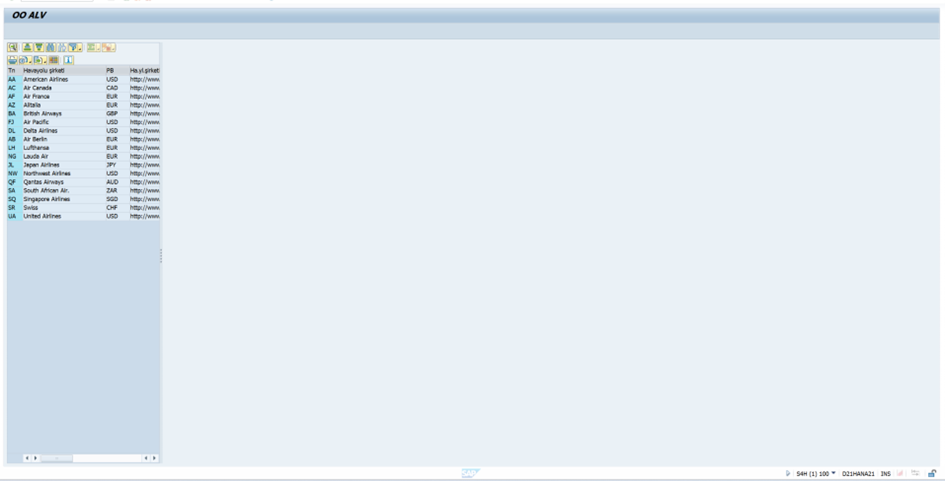
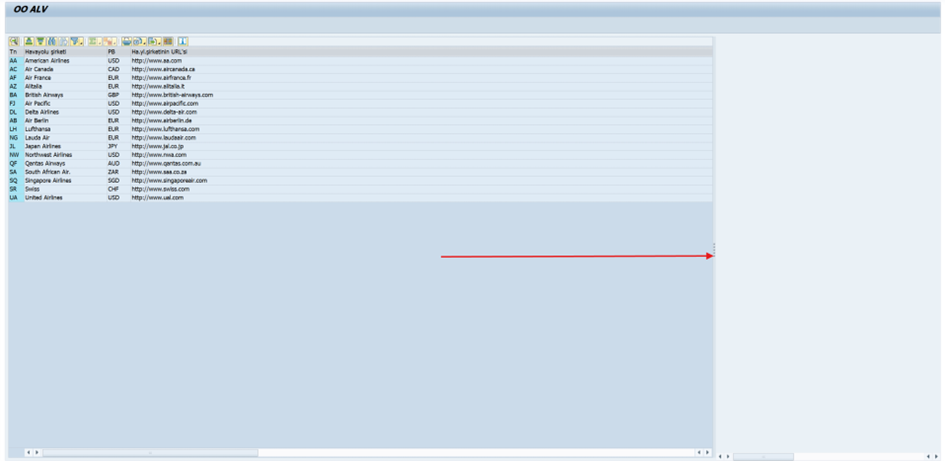
Görüldüğü üzere sol kenara yaslanmış ve genişliği ayarlanabilen bir docking container basılmıştır.
cl_gui_alv_grid tipinde bir alv objesi ve cl_gui_docking_container tipinde bir container tanımlayınız.

- go_dock_cont objesini yaratınız.
side = cl_gui_docking_container=>dock_at_left " Side to Which Control is Dockedkod satırı alv’nin ekranın hangi tarafında konumlanacağını seçmemize yarar.
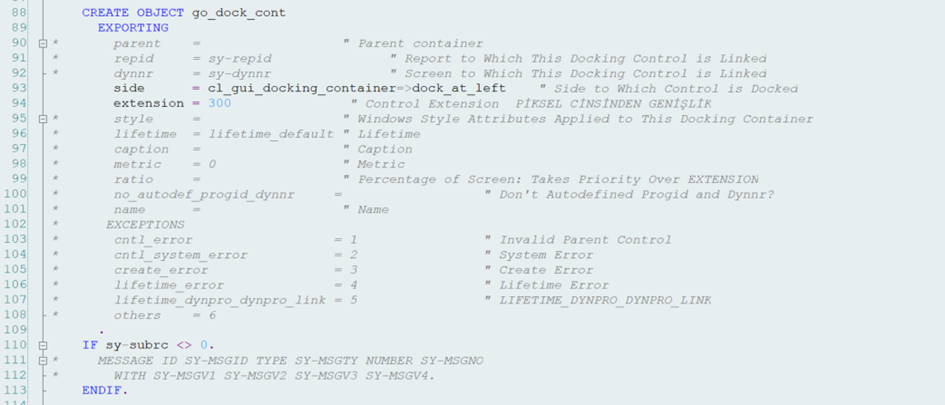
extension = 300 satırı ise alv’nin kaplayacağı alanı piksel cinsinden ifade eder.
go_dock_alv objesini yaratınız. Alv objesinin ebeveyni (parent) olarak yukarıda yarattığımız container’ı veriniz.

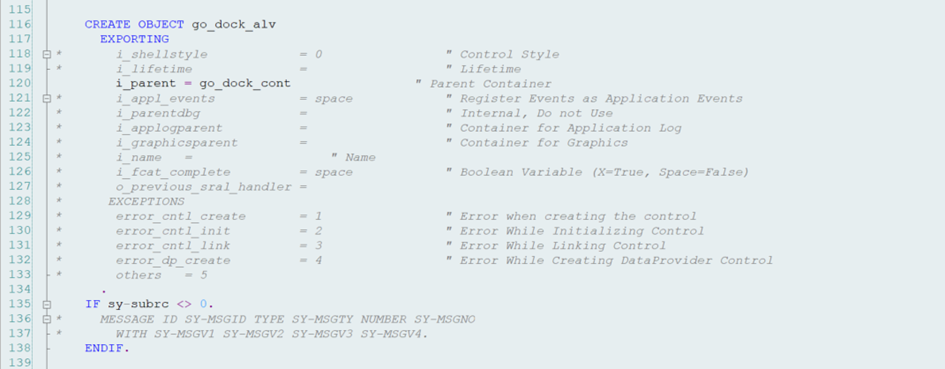
Alv objesini basınız.
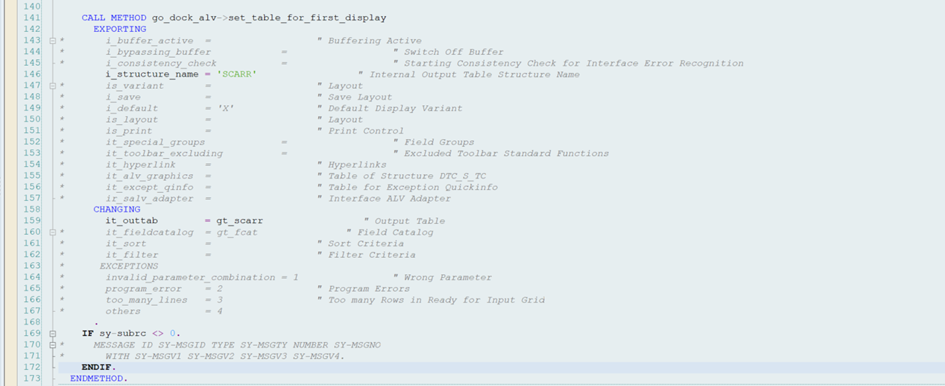
KODLAR:
"DOCKING CONTAINER
DATA: go_dock_alv      TYPE REF TO cl_gui_alv_grid,
             go_dock_cont   TYPE REF TO cl_gui_docking_container.
"Internal table created table type of scarr
DATA: gt_scarr  TYPE TABLE OF scarr.
"GET DATA
SELECT *
      FROM scarr
      INTO TABLE gt_scarr.
"CREATE DOCK CONTAINER
   CREATE OBJECT go_dock_cont
      EXPORTING
*       parent    =                  " Parent container
*       repid     = sy-repid               " Report to Which This Docking Control is Linked
*       dynnr     = sy-dynnr               " Screen to Which This Docking Control is Linked
        side      = cl_gui_docking_container=>dock_at_left    " Side to Which Control is Docked
        extension = 300               " Control Extension  PİKSEL CİNSİNDEN GENİŞLİK
*       style     =                  " Windows Style Attributes Applied to This Docking Container
*       lifetime  = lifetime_default " Lifetime
*       caption   =                  " Caption
*       metric    = 0                " Metric
*       ratio     =                  " Percentage of Screen: Takes Priority Over EXTENSION
*       no_autodef_progid_dynnr     =                  " Don't Autodefined Progid and Dynnr?
*       name      =                  " Name
*      EXCEPTIONS
*       cntl_error                  = 1                " Invalid Parent Control
*       cntl_system_error           = 2                " System Error
*       create_error                = 3                " Create Error
*       lifetime_error              = 4                " Lifetime Error
*       lifetime_dynpro_dynpro_link = 5                " LIFETIME_DYNPRO_DYNPRO_LINK
*       others    = 6
      .
    IF sy-subrc <> 0.
*     MESSAGE ID SY-MSGID TYPE SY-MSGTY NUMBER SY-MSGNO
*       WITH SY-MSGV1 SY-MSGV2 SY-MSGV3 SY-MSGV4.
    ENDIF.


"CREATE ALV OBJECT
    CREATE OBJECT go_dock_alv
      EXPORTING
*       i_shellstyle            = 0                " Control Style
*       i_lifetime              =                  " Lifetime
        i_parent = go_dock_cont                " Parent Container
*       i_appl_events           = space            " Register Events as Application Events
*       i_parentdbg             =                  " Internal, Do not Use
*       i_applogparent          =                  " Container for Application Log
*       i_graphicsparent        =                  " Container for Graphics
*       i_name   =                  " Name
*       i_fcat_complete         = space            " Boolean Variable (X=True, Space=False)
*       o_previous_sral_handler =
*      EXCEPTIONS
*       error_cntl_create       = 1                " Error when creating the control
*       error_cntl_init         = 2                " Error While Initializing Control
*       error_cntl_link         = 3                " Error While Linking Control
*       error_dp_create         = 4                " Error While Creating DataProvider Control
*       others   = 5
      .
    IF sy-subrc <> 0.
*     MESSAGE ID SY-MSGID TYPE SY-MSGTY NUMBER SY-MSGNO
*       WITH SY-MSGV1 SY-MSGV2 SY-MSGV3 SY-MSGV4.
    ENDIF.


"DISPLAY ALV
    CALL METHOD go_dock_alv->set_table_for_first_display
      EXPORTING
*       i_buffer_active  =                  " Buffering Active
*       i_bypassing_buffer            =                  " Switch Off Buffer
*       i_consistency_check           =                  " Starting Consistency Check for Interface Error Recognition
        i_structure_name = 'SCARR'                 " Internal Output Table Structure Name
*       is_variant       =                  " Layout
*       i_save           =                  " Save Layout
*       i_default        = 'X'              " Default Display Variant
*       is_layout        =                  " Layout
*       is_print         =                  " Print Control
*       it_special_groups             =                  " Field Groups
*       it_toolbar_excluding          =                  " Excluded Toolbar Standard Functions
*       it_hyperlink     =                  " Hyperlinks
*       it_alv_graphics  =                  " Table of Structure DTC_S_TC
*       it_except_qinfo  =                  " Table for Exception Quickinfo
*       ir_salv_adapter  =                  " Interface ALV Adapter
      CHANGING
        it_outtab        = gt_scarr                 " Output Table
*       it_fieldcatalog  = gt_fcat               " Field Catalog
*       it_sort          =                  " Sort Criteria
*       it_filter        =                  " Filter Criteria
*      EXCEPTIONS
*       invalid_parameter_combination = 1                " Wrong Parameter
*       program_error    = 2                " Program Errors
*       too_many_lines   = 3                " Too many Rows in Ready for Input Grid
*       others           = 4
      .
    IF sy-subrc <> 0.
*     MESSAGE ID SY-MSGID TYPE SY-MSGTY NUMBER SY-MSGNO
*       WITH SY-MSGV1 SY-MSGV2 SY-MSGV3 SY-MSGV4.
    ENDIF.